Fusion modding · UNITS / AVIA / LAND/DOM
FrançaisConfigure a building
This guide changes the health of an existing building. Its index and graphics stay the same. The example files and resources were inspected. APS packaging and the Fusion or Mapeditor procedure were not run here.
Find the active archive
- Record the theme and scheme number of the map.
- Record the game archive chain from
sudtest.ini. - Record the editor archive chain from
maped.ini. - Identify the
dom.rescontainer used by this scheme. - Identify the loaded
LAND/domfile and its includes. - Work on copies of the affected archives.
Directory names give candidates. They do not establish which archive has priority in your installation. The game and editor can use different chains. An unloaded descdom file has no effect.
Two source examples
These examples use sommer_s1/dom.res and sommer_unit_s1/LAND/descdom. The source association was checked for these indices. Their use in your installation still needs a check.
| Object | obj index | Resource class | Created sheet | Source line |
|---|---|---|---|---|
| House, named “Batiment” | 0 | 0 | house | sommer_unit_s1/LAND/descdom:1 |
Casemate, with bunker selection | 26 | 2 | house | sommer_unit_s1/LAND/descdom:651 |
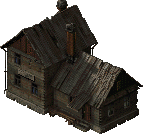

The previews show the A1 layers of state 0. They omit some shadows and secondary layers. The portal inventory stores hashes of the records and previews.
To make the previews locally, run this command from the Fusion sources:
python3 tools/extract_sprites.py sommer_s1/dom.res -o /tmp/sommer-s1-buildings
The script creates sprite_0000.png and sprite_0026.png. It needs Pillow. This extraction creates images. It does not package archives.
Change the house
The original block starts with:
Name obj 0 "Batiment"
HP obj 0 1000 1000 1000 1000
For a health trial, replace only the HP line:
HP obj 0 1100 1100 1100 1100
The code predicts initial health of 4400 instead of 4000 for a placement in state 0. The value 1100 makes the change measurable. It is not a balance recommendation.
- Keep the ARMOR and PROTECTION lines in the block.
- Keep index 0.
- Keep the original encoding and CRLF line endings.
- Find other
HP obj 0lines in the included files. - Check for a later
objline that replaces your value. - Package the complete archive with your usual APS tool.
- Replace the test copy of that archive in the intended chain.
The reference sources provide readers and text repair tools. They do not provide a verified APS command here. Do not add an arbitrary archive containing only descdom. Fusion tools report a failure with that arrangement for some realigned schemes.
Test the change
- Open a test map in the editor.
- Place the house graphic type in state 0.
- Check its name and preview.
- Start the map with the recorded DLL and archives.
- Measure the initial health.
- Put an infantry unit into the building.
- Move that unit out of the building.
- Apply controlled damage through each state change.
- Check the ruin image and effects.
- Save the game.
- Load the saved game.
- Repeat the checks with casemate index 26.
For a second environment, find the index in its own dom.res. Do not automatically copy obj 0 or obj 26. Another theme can use a different building at that index.
Record the trial with this table:
| Item | Record |
|---|---|
| Installation | Fusion version, DLL hash, mod options. |
| Map | Scheme, graphic container, game and editor archive chains. |
| Change | File, index, old and new line, archive hash. |
| Result | Health, occupation, firing, state changes, save and reload. |
Tunnels and new graphics
europe2_unit/LAND/descdom:1476 names index 64 “Tunnel”. europe2/dom.res gives that index class 11. Loading therefore selects __testportal. This observation does not confirm transport, links, or capacity.
Test entry, exit, travel, and saving separately with an existing working tunnel. The resource page identifies the remaining steps for new graphics.